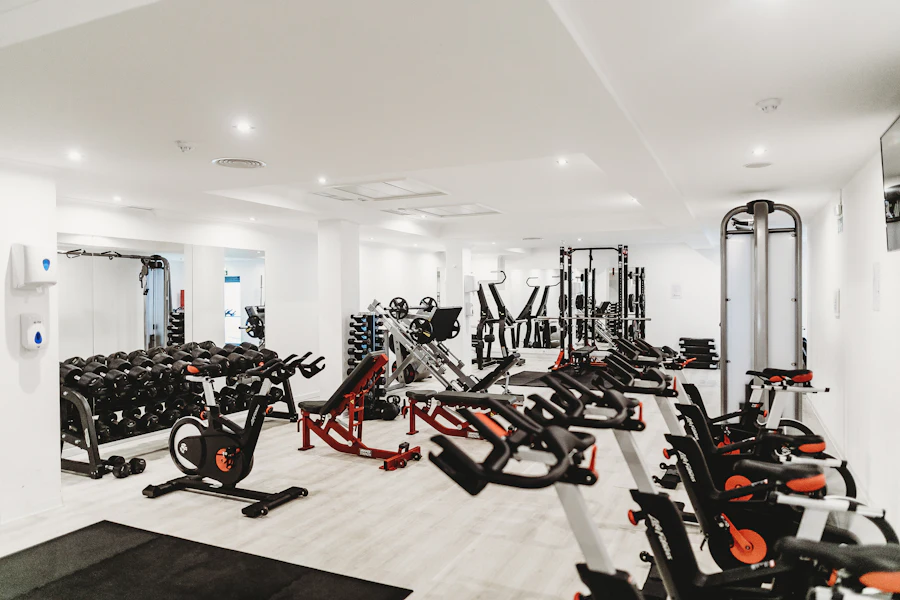
How to Set Up an AI Home Gym from Photos: A Practical Workflow for Turning a Room Into a Training Plan
Learn the photo-to-program workflow that turns a gym snapshot into a usable training plan, including detection errors, equipment mapping, and how to choose exercises from what’s actually there.
If you’ve searched for how to set up an ai home gym from photos, you’ve probably found generic “home gym ideas” pages that never show the real workflow. The useful question is not whether AI can identify a bench or barbell; it’s how to turn a few photos into a training plan that matches the equipment, the space, and the limits of the room.
Start with the right output: not a room tour, a training inventory
The first mistake is asking AI for “a home gym setup.” That produces décor advice. Ask for an equipment inventory instead. Your goal is a table with four columns: item, confidence, function, and training implication.
For example:
- Adjustable bench: high confidence, supports pressing and single-leg work
- Power rack: high confidence, supports barbell squats, benching, pull-up variations
- Dumbbells up to 50 lb: medium confidence, primary hypertrophy tool, load ceiling limits lower-body progression
- Cable stack: low confidence if partially occluded, valuable for rows, pulldowns, flyes, curls
That shift matters because exercise selection is constrained by what the system detects. If the image recognition misses a landmine attachment or a set of dumbbell handles, the plan may underuse strong tools or prescribe movements you can’t actually load. Object detection models are powerful but imperfect; real-world performance depends on angle, occlusion, lighting, and clutter (He et al., 2017; Redmon et al., 2016).
The photo-to-equipment workflow that actually works
Use a three-pass process.
Pass 1: capture usable images
Take 5–8 photos, not one.
Use this sequence:
1. Wide front view from the doorway
2. Wide corner view from the opposite corner
3. Side view along the longest wall
4. Close-up of any rack, bench, cables, or dumbbell storage
5. Floor-level shot for plates, kettlebells, step boxes, or compact machines
Photography rules:
- Turn on all lights
- Avoid backlighting from windows
- Stand far enough back to keep all major items in frame
- Take one horizontal and one vertical version if the room is cramped
- If an item is partly hidden, photograph it directly
The reason is simple: detection systems are good at prominent objects, but partially hidden equipment creates false negatives. In practice, a rack corner may be recognized while a pulley attachment is missed, and that changes what movements the plan should prioritize.
Pass 2: force the model to classify function, not just name objects
A good prompt is specific:
“Identify all training equipment visible in these photos. For each item, estimate confidence, note if it is load-bearing or accessory, and tell me what exercises it enables. Separate high-confidence items from uncertain items. If you are unsure, say so. Do not invent equipment.”
Then ask for a second pass:
“Convert the equipment list into a training menu sorted by movement pattern: squat, hinge, push, pull, carry, core, conditioning. For each pattern, list only exercises that are clearly supported by the detected equipment.”
That second step is where detection changes exercise selection. A rack enables barbell back squats, bench presses, rack pulls, and pull-ups. If the model only sees dumbbells and a bench, it should bias toward split squats, goblet squats, Romanian deadlifts, floor presses, and one-arm rows. A machine cable stack opens up low-friction hypertrophy work that is usually better tolerated at moderate-to-high reps because resistance is continuous through the range of motion.
Map detected equipment to the right training goal
A photo inventory is only useful if it drives programming decisions.
If you have a barbell, rack, and plates
You can run a real strength-focused plan.
Use:
- Main lower-body lift: 3–5 sets of 3–6 reps at RPE 7–9
- Main press: 3–5 sets of 3–6 reps at RPE 7–9
- Secondary hinge or pull: 3–4 sets of 5–8 reps
- Accessories: 2–4 sets of 8–15 reps
This setup supports progressive overload in the classic sense: load, reps, or sets can rise over time because the implement is scalable. That matters for long-term strength development, since strength gains are highly specific to the trained movement and load range (Schoenfeld et al., 2017).
If you have dumbbells, bench, and pull-up bar only
Now the program should shift.
Use:
- Unilateral lower body: Bulgarian split squat, step-up, rear-foot elevated split squat — 3–5 sets of 6–12 reps each leg
- Horizontal press: dumbbell bench or floor press — 3–5 sets of 6–12 reps
- Vertical pull: pull-ups or assisted pull-ups — 4–6 sets of 3–10 reps
- Hinge: dumbbell RDL or hip thrust — 3–4 sets of 8–15 reps
- Core and carries: 2–4 rounds
This is not a downgrade. It is a different progression model. With limited load ceiling, you progress via unilateral loading, slower eccentrics, longer pauses, added range of motion, and higher weekly volume. Hypertrophy responds well across a broad rep spectrum when sets are taken close to failure and volume is sufficient (Schoenfeld et al., 2017; Morton et al., 2016).
If the photo shows mostly cardio equipment and minimal resistance tools
Do not pretend it’s a full strength gym.
Use:
- Conditioning: 2–4 sessions/week
- Bodyweight strength: push-up variations, split squats, hip hinges, inverted rows if available
- Density work: EMOMs or timed circuits
If the model identifies no rack, no barbell, and dumbbells capped below 25 lb, the plan should avoid prescribing heavy bilateral lower-body work as the main driver. In that setting, high-rep split squats, tempo goblet squats, push-up progressions, and row variations are the honest options.
Edge cases that break photo-based AI setup
Mirrors and reflective surfaces
Mirrors cause duplicate detections. The system may “see” two benches or miscount plates. Use the mirrored image as a secondary check, not the main source of truth.
Home-gym clutter
Band hooks, collars, ab mats, handles, and clips are often ignored. That is fine, because they matter less than primary load tools. But small accessories can change exercise quality. A low cable handle can convert a basic setup into a row-and-press machine. If the AI misses them, manually add a final checklist.
Foldable or hidden equipment
Adjustable racks, fold-away benches, and wall-mounted storage are frequently under-detected when collapsed. Photograph equipment in its working position.
Mixed-use rooms
A room may contain fitness gear plus furniture, toys, or boxes. Ask the model to ignore non-training objects and estimate clear floor space in square feet or meters. That affects whether you can safely program sled drags, farmer carries, or dynamic dumbbell work.
Poor lighting and occlusion
Dark corners kill recognition. If the barbell sleeve is visible but the plates are stacked behind a tote, the model may detect “barbell” and miss total load. That can lead to bad prescription. The fix is manual verification: count plates yourself and tell the AI the total load range.
How detection changes exercise selection in practice
Here’s the key point: the program should not just mirror the room; it should respect the confidence level of the detection.
High-confidence equipment
Use it as a program anchor.
If the AI is certain about a rack and barbell, make one weekly session centered on squats or deadlifts. If it is certain about a pulley stack, build rows, pulldowns, flyes, triceps work, and face pulls into the plan.
Medium-confidence equipment
Use it as a conditional bonus.
If the system says “likely adjustable dumbbells,” write the plan so it still works if they’re present, but provide a fallback. Example:
- Primary: dumbbell bench press
- Fallback: push-ups with tempo
Low-confidence equipment
Do not base your core plan on it.
A low-confidence landmine attachment should not be the linchpin of a lower-body program. Treat uncertain detections as optional accessories.
That hierarchy is how you avoid the classic AI failure mode: a polished plan built on equipment that is not actually in the room.
A concrete prompt stack that gets better results
Use the model in three steps.
Step 1: inventory
“From these photos, create an equipment inventory with confidence ratings. Include only items visible in at least one photo.”
Step 2: capacity
“Estimate the training capacity of the room: max simultaneous lifters, safe floor space, likely load ceiling, and whether the room supports barbell strength, dumbbell hypertrophy, conditioning, or only bodyweight work.”
Step 3: program
“Build a 4-day training plan using only the clearly detected equipment. For each exercise, explain why it fits the available tools. Include sets, reps, RPE, and progression rules. If the equipment set is incomplete, give fallbacks.”
That order matters because AI is much better at summarizing what it sees than at making a usable program from an ambiguous single prompt.
How to apply this
Use this exact workflow this week:
1. Take 5–8 photos of your gym from multiple angles with bright light.
2. Ask AI for an equipment inventory with confidence ratings.
3. Manually correct any missed bars, plates, benches, cables, or pull-up stations.
4. Ask for a movement-pattern map: squat, hinge, push, pull, carry, core, conditioning.
5. Build the program only from high-confidence equipment.
6. Set one fallback for every major lift.
7. Run the plan for 2 weeks, then re-photo the room if equipment changes.
A simple 4-day template for a dumbbell-plus-bench gym:
- Day 1: Lower body — Bulgarian split squat 4x8/leg, DB RDL 4x10, calf raise 3x15, plank 3x45s
- Day 2: Upper body — DB bench 4x8, one-arm row 4x10/side, DB overhead press 3x8, curls 2x12
- Day 3: Lower body — step-up 3x10/leg, hip thrust 4x12, goblet squat 3x15, carry 4x30 m
- Day 4: Upper body — pull-up or inverted row 5xAMRAP, incline DB press 4x10, lateral raise 3x15, triceps 2x15
Progress by adding 1 rep per set until the top of the range, then add load. If load is capped, add a set or slow the eccentric to 3 seconds. That gives the plan a real progression model instead of a static photo-based guess.
The rule that keeps photo-based planning honest
If the AI cannot clearly identify the equipment, the exercise should not depend on it. The room does not care what the model guesses. Your training quality depends on what is actually there, not what the image recognition wants to believe.
When you use photos to build the inventory first and the program second, AI becomes genuinely useful: it stops being a generic gym-idea generator and starts acting like a fast, reasonably disciplined programming assistant.